Free AI Listing Description Generator
Describe a listing and get an MLS description, an Instagram caption and a follow-up message for buyers. On this page you type the property details. With a free account, you can also start from the original photo of a room you've staged. Staging a room uses 1 credit; writing the copy never does.
Example: from photo to listing copy
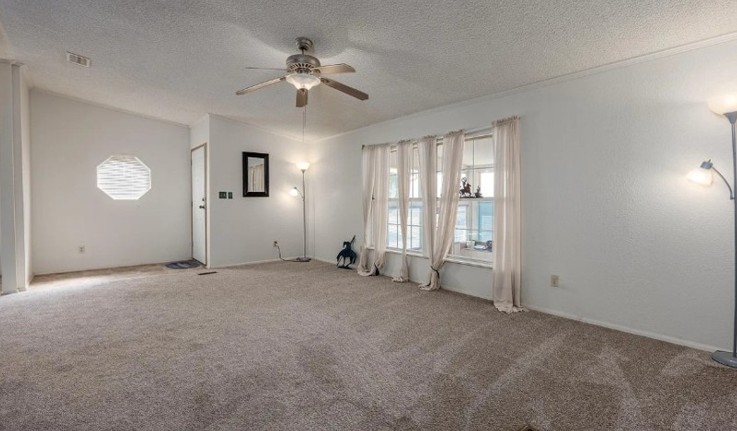
Real output from the Copy Kit, generated from the original photo of a room staged in a free account
MLS Description
This spacious main living area offers a bright and welcoming setting with flexible layout possibilities. Large windows fill the space with natural light, complementing the soft neutral tones and an overhead ceiling fan. A geometric accent window near the entry adds a distinct touch of architectural character to the space. The open room flow allows plenty of room for comfortable seating and effortless everyday living. Contact us to schedule a tour and explore the possibilities.
Follow-up DM
I came across this listing today and thought the open living space might catch your eye. The natural light and comfortable layout make it really stand out. Would you be interested in taking a tour this week?
How it works
Step 1
Add the property
Type the property type, location and key features here. With a free account, you can also start from the original photo of a room you've staged (staging a room uses 1 credit).
Step 2
Generate
You get an MLS description, an Instagram caption and a follow-up message in one go.
Step 3
Check and edit
Read the draft, fix anything that is off and check it against your MLS board's rules before you publish.
What makes a good listing description
Lead with what buyers notice first
Open with the room or feature a buyer sees in the first photo, not with a general line about the home.
Name specific features
"Large windows" and "a ceiling fan" tell a buyer more than "beautiful" or "stunning". Specific details are also easier to check.
Stay accurate
Only describe what is really there. A buyer who tours the home and finds something missing stops trusting the rest of the listing.
Keep it short
Short sentences and a clear order (main space, light, layout, call to action) are easier to read on a phone.
End with one clear next step
Close with a single call to action, such as booking a tour.
For more detail, read our guide to writing property descriptions that sell and the common listing-copy mistakes.
Frequently asked questions
Is the listing description generator free?
Yes. Writing a listing description, an Instagram caption and a follow-up message never uses a credit. You can try it on this page without an account. A free account shows the caption and the message in full, and lets you start from the original photo of a room you've staged. Staging a room uses 1 credit; writing the copy never does.
Does it work for MLS?
It writes a draft MLS description of up to 150 words. Every MLS board has its own rules, so check the draft against your board's rules before you publish it.
Does it invent features?
No. It only describes what is in your photo or what you type. If a feature is not in the photo or in your notes, it stays out of the description.
What languages does it write in?
US English only, with US real estate terms such as "showing" and "tour".
Can I edit the result?
Yes. The result is plain text. Copy it, edit it and paste it wherever you need it.
Have empty rooms in your listing photos? See how AI virtual staging can furnish them.